

Verinomi Panel: Activity History, Notification History and Sent E-mails
You can follow what happens on your account on three separate pages in the client area: the actions you take are on the Activity history page, the notifications you receive are on the Notification history page, and the e-mails we send you are on the Emails sent page. All three are in the Account menu.
Activity history
Actions that make changes to your account are listed here, with the time and the IP address they were made from:
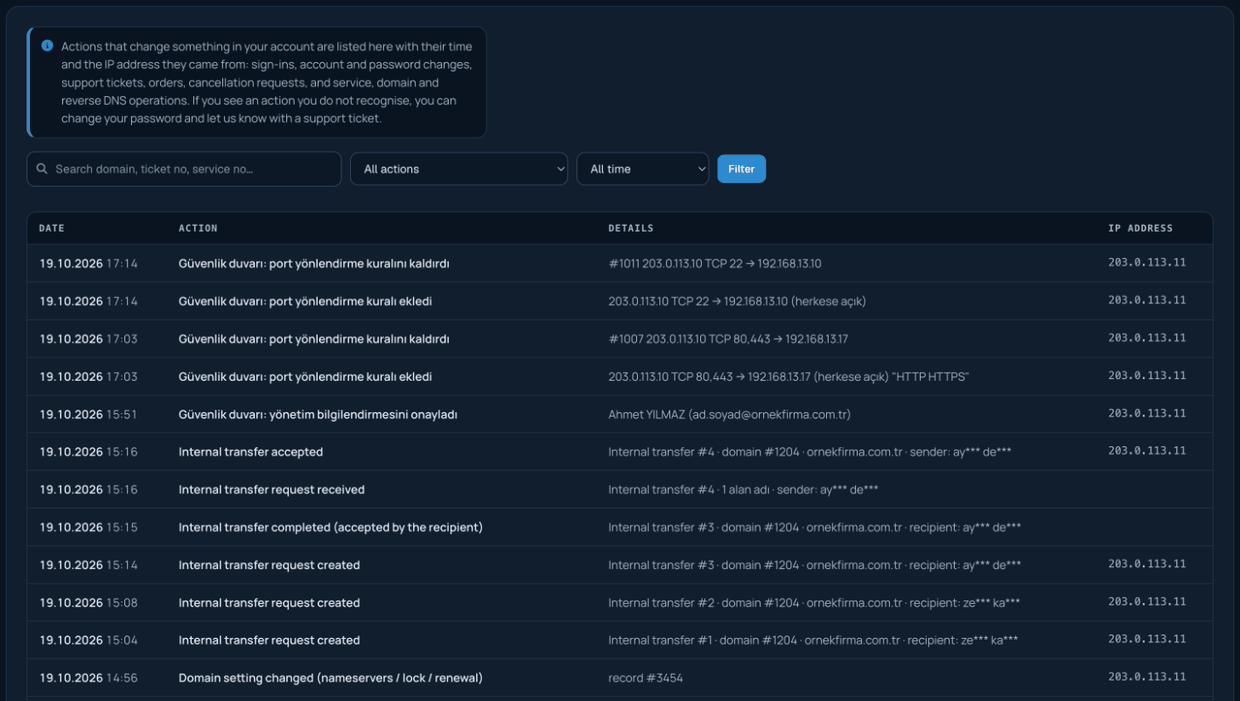
- Sign-ins
- Changes to account details, password, users and contacts; turning two-step verification on and off
- Opening, replying to and closing support tickets
- Orders, cancellation requests, upgrades and receipt actions
- Service actions such as powering a server on or off and one-click sign-in to the control panel
- Domain actions such as nameserver, DNS, contact details and transfer code
- Reverse DNS changes and internal transfer steps
You can filter by topic and period, and search by domain, ticket number or service number. Actions taken on your account by our team are marked "by Verinomi staff". Values such as passwords, message contents or card details are not recorded; only what was changed is shown.
If you see an action you do not recognise, change your password and let us know through a support ticket. The Previous sign-in card on the client area home page also shows the time and IP address of your previous sign-in.
Notification history
The notifications shown on the bell in the top bar are kept here for 90 days: overdue receipts, support replies, domain and service reminders, security alerts and internal transfer requests. Each row shows when the notification arrived, its type and its status. Notifications marked Resolved also show when the notification was cleared; for example, when a receipt was paid or a reply was read. You can filter by type (receipts and payments, support, domains, services, security, internal transfer) and by status (open / resolved). Attack alerts and support replies that arrive while you are not signed in are recorded as well.
Emails sent
Copies of the e-mails we send to your account are kept here; you can open and read any of them again. The boxes at the top group the e-mails into receipts and payments, domains and support. So that the page opens quickly, it shows the e-mails from the last 6 months; you can reach them all with Show all. E-mail attachments are only sent with the e-mail itself; you can download your receipts from the Receipts page.
If you see a password reset or sign-in e-mail you were not expecting, we recommend changing your password.
Activity history and notification history are only available to the account owner.
