

Verinomi Panel: Mobile Number, SMS Codes and Information Messages
To protect your account, we send a one-time code to your mobile phone by SMS at certain steps. This article explains mobile number verification, two-step verification, which actions ask for an SMS code, how to change your number and the information messages, step by step. All settings are on the Account > Security page of the client area.
Why do we ask for SMS verification?
Even if your password falls into someone else's hands, critical actions such as moving your services to another account or transferring your domain to another provider cannot be done without the code sent to your phone. Codes are only sent to the verified number on your account. Verinomi staff will never ask you for these codes by phone or e-mail; please do not share them with anyone.
Verification at first sign-in
If your account has no verified mobile number, a verification window opens when you sign in. It has two steps:
- Verify your mobile number. A 6-digit code is sent to the number on your account; once you enter it, your number is verified. If the number is wrong or you no longer use it, you can enter your new number in the same window. This step is required.
- Turn on two-step verification. You can turn it on with SMS or with an authenticator app (explained below). If you do not want it, you can tick that you accept the responsibility and continue with No thanks, continue. Your choice is recorded and the window does not ask again; you can turn it on later on the Security page at any time.
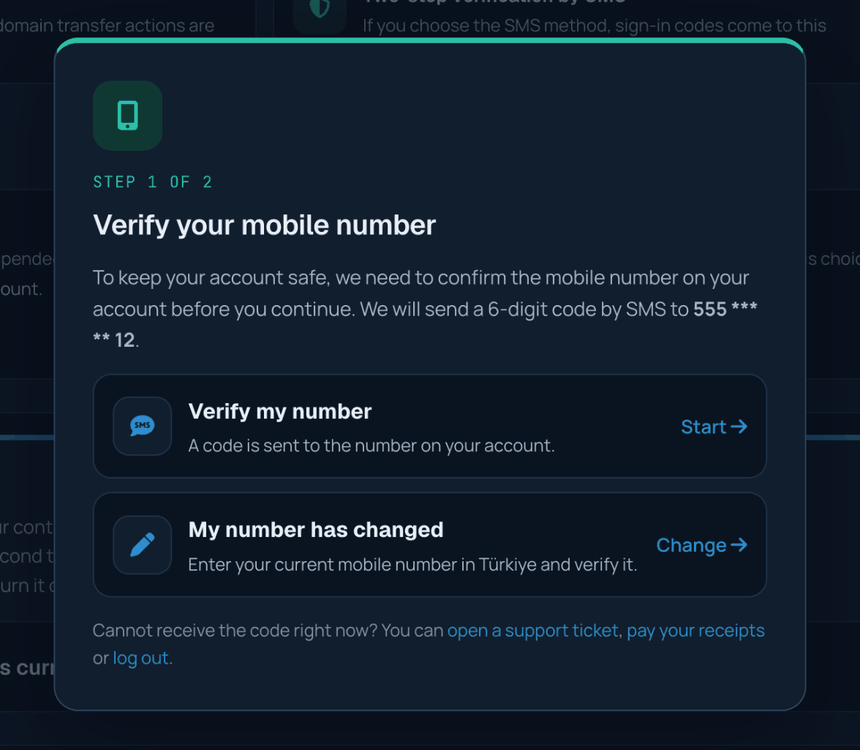
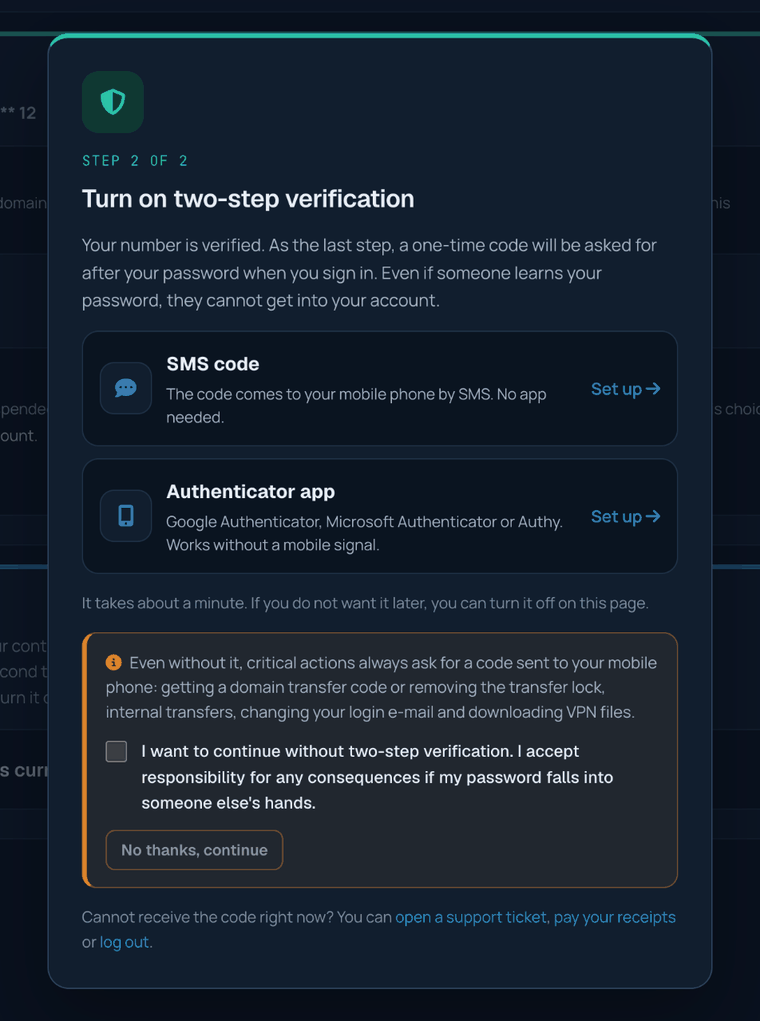
Until verification is complete, most of the client area is closed. Meanwhile you can open a support ticket, view and pay your receipts, and sign out.
Two-step verification
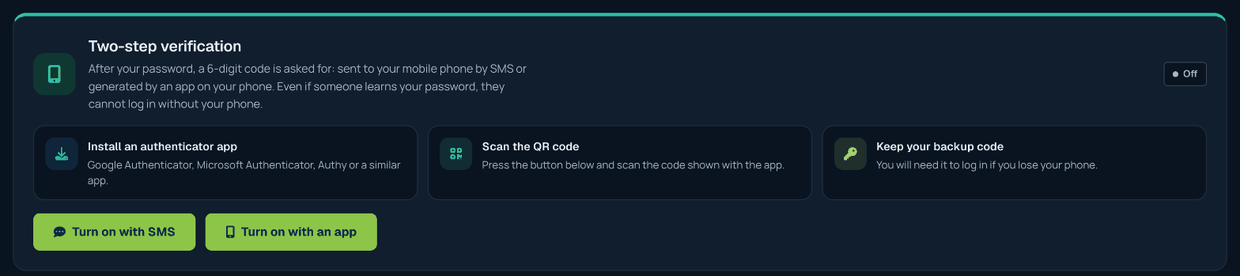
With two-step verification on, a code is asked after your password when you sign in. You can receive it by SMS or with an authenticator app. Setup, the backup code, turning it off and what to do if you cannot reach your codes are explained step by step in the Two-Step Verification (SMS and Authenticator App) article.
Which actions ask for an SMS code?
For the following actions an additional code is sent to your phone, whether or not two-step verification is on:
- Internal transfer: when sending a service or domain to another Verinomi account and when accepting one sent to you. The SMS briefly states what is being moved and to which account.
- Moving a domain to another provider: to view the transfer (EPP) code and to remove the transfer lock.
- Firewall VPN file: to download the OpenVPN configuration file.
- Changing your sign-in e-mail and resetting your password by phone.
For domain and VPN actions the code is sent only by SMS; while SMS cannot be sent, these actions are on hold. One verification is valid for an hour; during that time you are not asked for a new code for the same kind of actions. See the Managing Your Domains article for details.
Changing your mobile number
In the Mobile number section of the Account > Security page, click Change the number:
- First a code is sent to your current number; this confirms that the change is made by you.
- Then you enter your new number; a code is sent to the new number as well.
- Once both codes are verified, the new number is saved to your account.

For your security, internal transfers and domain transfer actions are paused for a while after the number changes; the remaining time is shown on the related page. If you can no longer reach your old number, you can open a support ticket.
Information messages
In some situations we send you a short information SMS:
- When a receipt is past its due date
- When a service is suspended because of an unpaid receipt
- When your domain is about to expire (7 days or less left) and when it has expired
- When your support ticket is answered
- When an internal transfer request is sent to your account
- When there is a serious issue affecting your service
You can turn these messages on or off in the Information SMS section of the Account > Security page. Confirmation codes are always sent regardless of this choice.

Sending notifications to another number
You may want information messages to go to another number, for example your accounting team. In the same section, click Use another number and enter the number; a code is sent to it to confirm that it belongs to you and is reachable. After the change, an information message is sent to the number on your account. To have notifications come to your own number again, use Use the number on my account. Confirmation codes always go to the verified number on your account.

Security notifications
In the following cases a warning message is sent to the number on your account. They are for your security and cannot be turned off:
- When your account password is changed
- When the number that receives information messages is changed
- When your IP address is temporarily taken offline because of heavy attack traffic and when it is reachable again
If you did not make these changes, please change your password and let us know with a support ticket.
SMS messages we send
All our SMS messages come from the sender name VERINOMI. Turkish characters are not used so that the message shows correctly on every phone and fits in a single SMS.
Confirmation codes
Codes are always sent, regardless of your information preference. The message says what the code is for; if you receive a code for an action you did not start, do not share it with anyone and change your password.
| When | Example text |
|---|---|
| At sign-in (if two-step verification by SMS is on) | Verinomi login code: 123456. Do not share this code with anyone. |
| When verifying your mobile number | Verinomi phone verification code: 123456. Do not share this code with anyone. |
| When changing your number (to the old and the new number) | Verinomi phone number change code: 123456. Do not share this code with anyone. |
| When setting up two-step verification by SMS | Verinomi two-step verification setup code: 123456. Do not share this code with anyone. |
| Transfer code, removing the transfer lock, VPN file | Verinomi security approval code: 123456. Do not share this code with anyone. |
| When sending and accepting an internal transfer (the message also briefly states what is being moved and to which account) | Verinomi internal transfer approval code: 123456. Do not share it. |
| When changing your sign-in e-mail | Verinomi login e-mail change code: 123456. Do not share this code with anyone. |
| When resetting your password by phone | Verinomi password reset code: 123456. Do not share this code with anyone. |
| When changing the notification number (to the new number) | Verinomi notification number verification code: 123456. Do not share this code with anyone. |
Information messages
Sent only if you have turned information SMS on; at most one message per subject every 24 hours.
| When | Example text |
|---|---|
| A receipt is past its due date | Verinomi: receipt #26800 is past its due date (1,250.00 TL). You can pay it from the client area. |
| A service is suspended | Verinomi: your service ornekfirma.com.tr has been suspended due to an unpaid receipt. It is reopened once the payment is made. |
| A domain is about to expire (7 days or less left) | Verinomi: your domain ornekfirma.com.tr expires on 26.10.2026. You can renew it from the client area. |
| A domain has expired | Verinomi: your domain ornekfirma.com.tr has expired; the site and e-mail may stop working. You can renew it from the client area. |
| Your support ticket is answered | Verinomi: your support ticket #123456 has a new reply. You can read it in the client area. |
| An internal transfer request is sent to your account | Verinomi: an internal transfer request was sent to your account (1 domain). You can review it in the client area. |
| There is a serious issue affecting your service | Verinomi: there is an issue affecting your service ornekfirma.com.tr; our team is working on it. Updates are on the System status page in the client area. |
Security notifications
Always sent for your security and cannot be turned off. If you did not make these changes, please change your password and let us know with a support ticket.
| When | Example text |
|---|---|
| Your password is changed | Verinomi: your account password was changed. If this was not you, please reset your password and open a support ticket. |
| Your sign-in e-mail is changed (sent in Turkish) | Verinomi: hesabinizin giris e-postasi degistirildi. Bu islemi siz yapmadiysaniz hemen destek talebi acabilirsiniz. |
| Two-step verification is removed with codes (sent in Turkish) | Verinomi: hesabinizda iki adimli dogrulama kaldirildi. Bu islemi siz yapmadiysaniz sifrenizi degistirip destek talebi acabilirsiniz. |
| The information SMS number is changed | Verinomi: your notification SMS number was changed to 555 *** ** 12. If this was not you, please open a support ticket. |
| Your IP address is temporarily taken offline because of an attack, and when it is reachable again | Verinomi: 203.0.113.10 was temporarily taken offline because of heavy attack traffic. The protection is lifted automatically in 30 minutes; no action is needed. |
If the code does not arrive
- Code validity: each code is valid for 5 minutes. When you request a new code, earlier ones stop working; always use the latest code.
- Sending again: you need to wait 60 seconds before requesting a new code. If the code sent a moment ago is still valid, the screen tells you that you can use it.
- Limits: at most 5 codes per hour are sent to a number and at most 20 codes per day to an account. A code entered wrongly 5 times stops working; you can request a new one.
- Number: SMS verification is available for mobile numbers in Türkiye only. You can check that your number is correct on the Account > Security page.
- Your phone: make sure your phone has coverage and its inbox is not full. On some phones, messages from unknown senders may go to a separate folder.
If the code still does not arrive, you can open a support ticket. Technical support is provided through support tickets only; our team will check your number and the delivery records.
Frequently asked questions
Will the verification window appear at every sign-in?
No. Once you verify your number and make your choice about two-step verification (turned it on or declined it), the window does not appear again.
I declined two-step verification; can I turn it on later?
Yes. You can turn it on with SMS or an app at any time on the Account > Security page.
There are other users on my account; will they be asked to verify too?
Mobile number verification is asked only of the account owner. Users you added to your account are asked to turn on two-step verification at their first sign-in; they can turn it on or continue by accepting the responsibility.
I told someone my code; what should I do?
Change your password right away and let us know with a support ticket. You can see the latest actions on your account on the Account > Activity history page.
