






Verinomi Panel: Automatic Payment from Credit
If you have added credit to your account, your service and domain renewals can be paid from your credit automatically, so you do not have to deal with receipts. You can choose which records this applies to, one by one or all together. Your card is not charged automatically; only the credit in your account is used.
How It Works
- When a renewal is due, a receipt is created.
- If your credit covers the whole receipt, the receipt is paid from your credit and you get one email showing the paid receipt and your remaining credit.
- If your credit does not cover it, nothing is deducted; partial payment is not made. The receipt stays unpaid and you can pay it as usual.
If a receipt contains both switched-on and switched-off records, the switched-on ones are moved to a separate receipt and only that receipt is paid from your credit.
Automatic payment from credit is on by default for all your services and domains. Add-credit and bulk payment receipts and services with a cancellation request are excluded.
From the Top Bar: One Click
Click the Your credit button in the top bar to see:
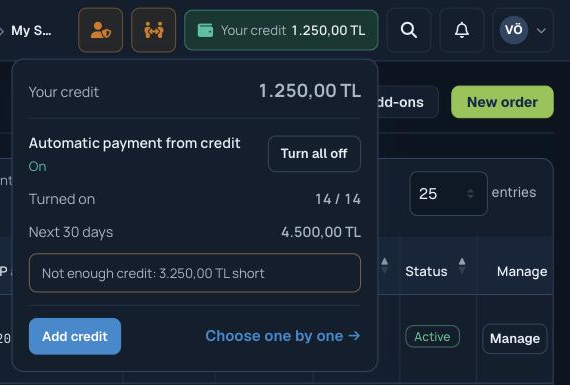
- Your credit and the status of automatic payment: On, Partly on or Off
- The Turn all on or Turn all off button. You are asked to confirm before turning it off.
- How many records it is on for, and the renewal total for the next 30 days
- The missing amount if your credit will not cover that total. This warning only appears when you have credit in your account.
Choosing One by One
In the Pay from credit column of the My Services and My Domains lists, each record has a switch; click it to turn it on or off for that record. Records showing "—" in this column do not get a receipt (for example free and one-time services, or services with a cancellation request).
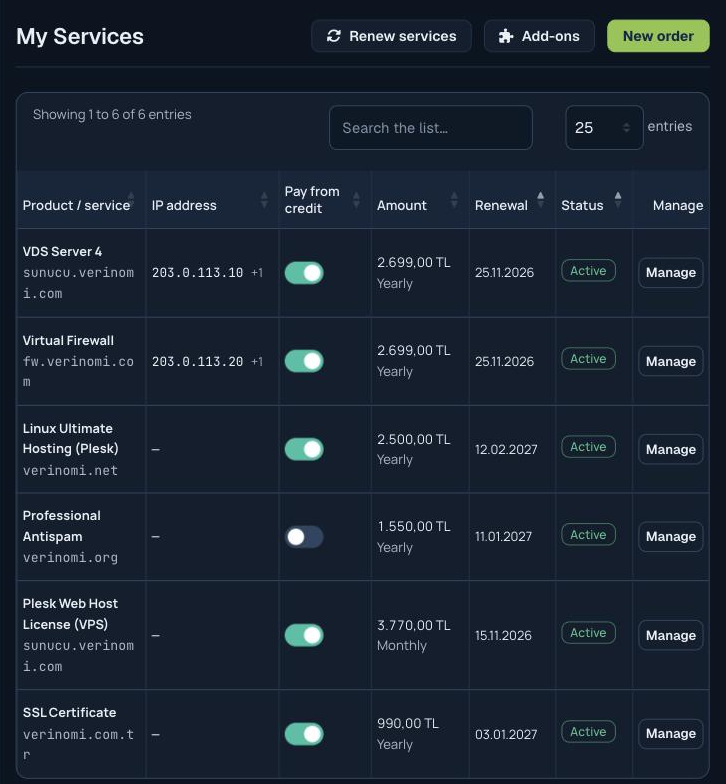
You can also change it from the Pay from credit line on the domain and service pages, and see all your records in a list on the Accounting > Add credit page.
In My Domains you can tick several domains and turn them on or off together from the Pay from credit menu on the bulk actions bar. Domains with auto-renew off do not get a receipt, so the switch is not shown for them.
When You Add Credit
When credit is added to your account, the panel asks "What would you like to do with it?". You can tick your unpaid receipts and pay them from your credit, or keep the credit in your account. Receipts created earlier are not paid automatically; for those, use this question or the Apply Credit section on the receipt page.
If Your Credit Will Not Be Enough
If your credit will not cover the switched-on records 3 days before a receipt is created, you get an email. It goes to accounts that have credit or have used credit recently, at most once a week. See Receipts, Payments and Account Statement to add credit.
