






Verinomi Panel: Uploading .tr Domain Documents
Most .tr extensions do not require documents. If you have registered an extension that does (such as .av.tr, .dr.tr or .k12.tr), or if the name you want is on TRABİS's list of restricted names, you need to upload documents for the domain to be allocated. You can see which extension requires which documents on our .tr Domain Documents page.
How Do I Know Documents Are Needed?
- You get an email; its button opens the Documents tab directly.
- The domain and the last day appear under Pending Actions on the client area home page.
- An Upload a document button appears on the domain's row in My Domains.
Uploading a Document
- Open the Documents tab on the domain page. The required documents and the last day are shown here.
- Choose the Document type and add the file. You can upload PDF, JPG, PNG or TIFF files of up to 10 MB. The document must be legible; PDF is preferred where possible.
- Click Upload and confirm. You can upload each document separately.
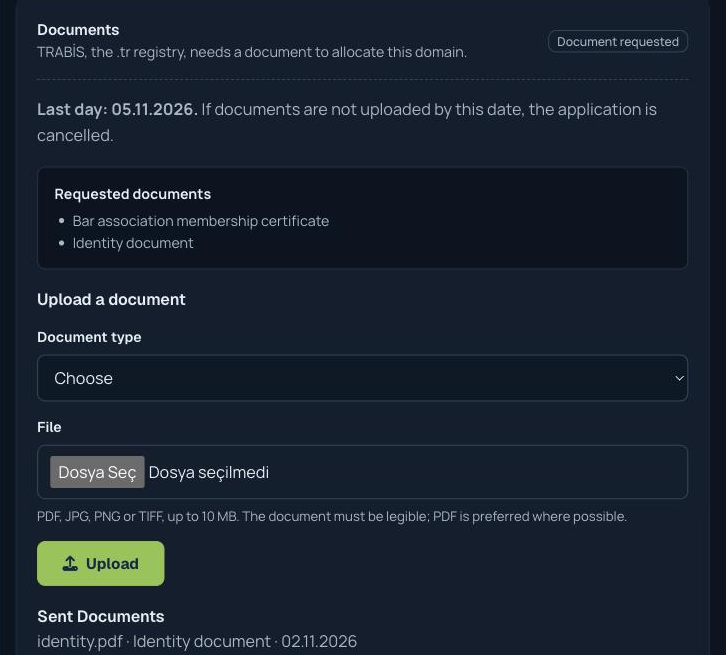
The document goes directly to TRABİS, the .tr registry, and cannot be recalled, so please make sure it is the right file before sending. Documents you have sent are listed under Sent Documents on the same tab.
Time Limit: 7 Days
You need to upload the documents within 7 days of the application date; after that, the application is cancelled. If TRABİS finds a document insufficient and asks again, the period does not restart; it still counts from the first date. You can see the last day on the Documents tab, and we also send a reminder email before it ends.
What Happens Next
- Under review: your document is with TRABİS and a result is awaited. You do not need to do anything; we will email you when there is news.
- Requested again: TRABİS found the document insufficient. Your application is still open and you can send the documents again.
- Once approved: your domain is allocated and becomes active.
If the Name Is Restricted
Even if the extension does not require documents, documents may be requested if the name is on TRABİS's list of restricted names (for example a brand or a generic word). In that case you can upload a statement explaining what you will use the name for, with a supporting document: a trademark certificate matching or containing the name, a trade registry record containing the name, or an activity or authorization certificate.
If you run into a problem, you can open a support ticket.
